 Activity Sage
Getting started
Swim Sage reads the swims your Apple Watch records in Apple Health and works everything out on your iPhone. It only reads Health: nothing you do in Swim Sage changes Apple Health, and nothing leaves your device unless you send it.
What you need
- An Apple Watch that records your pool swims, with Apple's Workout app or Swim Sage's own Watch app. Pool swims give Swim Sage every length; open water swims are listed and counted, without length timing.
- An iPhone on iOS 26 or later. Swim Sage also runs on iPad and Apple Vision Pro (version 26 or later); its Watch app needs Apple Watch Series 6, SE (2nd generation) or later on watchOS 26.
The first time you open it
- Tap Connect Apple Health and allow Swim Sage to read Workouts, Swimming distance, Swimming strokes, Heart rate and Active energy. It asks for nothing else.
- Swim Sage reads your swims ("Reading your swims"). A long history can take a little while the first time.
- Today opens on your newest swim. Pull down on Today or Swims at any time to read Health again.
No swims yet, or just curious? Tap Try with sample swims (on the first screen, or on the empty Today screen). Twelve weeks of made-up swims show every feature; a card on Today says they are samples, and Use my swims takes you back. Nothing you do with the samples is kept, synced or sent to your Watch.
If Swim Sage shows no swims, check it may read them: in the Health app, tap your profile, then Apps, then Swim Sage, and turn the categories on. Health never tells an app that it was refused, so Swim Sage can't say so itself.
The five tabs
- Today
- Your latest swim as a watch face, six swipeable charts, the race replay, this week, and what's worth knowing.
- Progress
- Every metric over time, with what it means and your records.
- Swims
- Every swim, searchable, with the Check list of swims the Watch may have got wrong.
- Targets
- What you want a swim to be, how each swim did against it, and challenges with friends.
- Ask
- Questions about your swims, typed or spoken, and your weekly and monthly reports.
Settings are behind the gear at the top of Today.
Today
Today answers "how did that go?" first, then "how is my swimming going?". From the top: your latest swim, the charts, the race replay, this week, then insights, your report and your recent swims.
The watch face: your latest swim
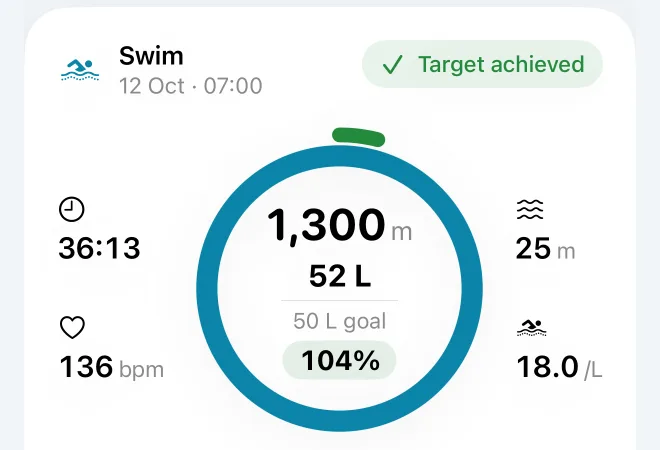
One swim on one face
- What it shows
The swim's date and time, and a badge: Target achieved (green tick), Not achieved (amber cross) or Couldn't judge. In the middle, the distance, the lengths, and with a target its goal and the percentage reached. Around it, four small figures with icons and no labels: the clock is workout time, the heart is average heart rate, the waves are the pool length, the swimmer is strokes per length.
- The ring
The aqua ring fills clockwise from 12 o'clock as you approach your target's amount (lengths or distance). Past 100%, a thinner green arc outside it shows the extra. With no target there is only the grey track.
- Worth knowing
The percentage is of the whole swim, so a swim can read 110% and still say Not achieved: you swam the lengths, but after the time limit. A small pencil beside a figure means you corrected it.
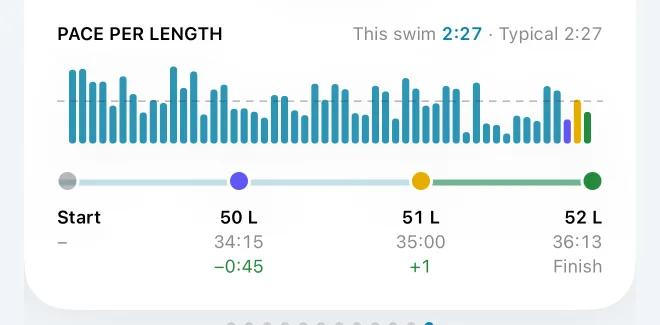
Pace per length
- What it shows
One bar for every length, in order. Taller is faster. The header gives this swim's pace and your typical pace; the dashed grey line is your typical pace, so bars above it were quicker than usual.
- The data
Each length's own time, from the length events your Watch records, worked out as pace per 100: the length's seconds divided by the pool length, times 100.
- Worth knowing
A very slow length (a rest at the wall, say) would flatten every other bar, so lengths slower than a cut off are drawn faint at the cut off. Bars coloured indigo, gold or green mark the lengths where the target timeline's moments fell. Typical pace is your median over the last 30 days, in the same pool length, and needs three swims.
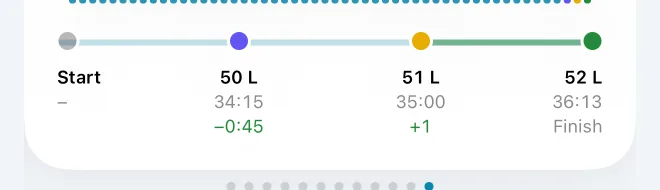
The target timeline
- What it shows
For a target like "50 lengths within 35:00", up to four moments, evenly spaced: Start, when you reached the target, where you were at the time limit, and the Finish.
- Reading the numbers
Under "reached": −0:42 means 42 seconds early (green); +0:42 means late (amber); "On time" means within half a second. Under the time limit: +2 means two lengths ahead of the target at that moment, −1 one behind. The Finish point is green if the target was achieved, amber if not.
- Worth knowing
The middle points are indigo then gold, in the order they happened. "On swimming time" appears when the target is judged on swimming time, which leaves rests out.
Swipe back, and press and hold to compare
- Tap the face to open the swim.
- Swipe right to go back through your twelve newest swims; Latest brings you back. The race replay below follows the swim on show.
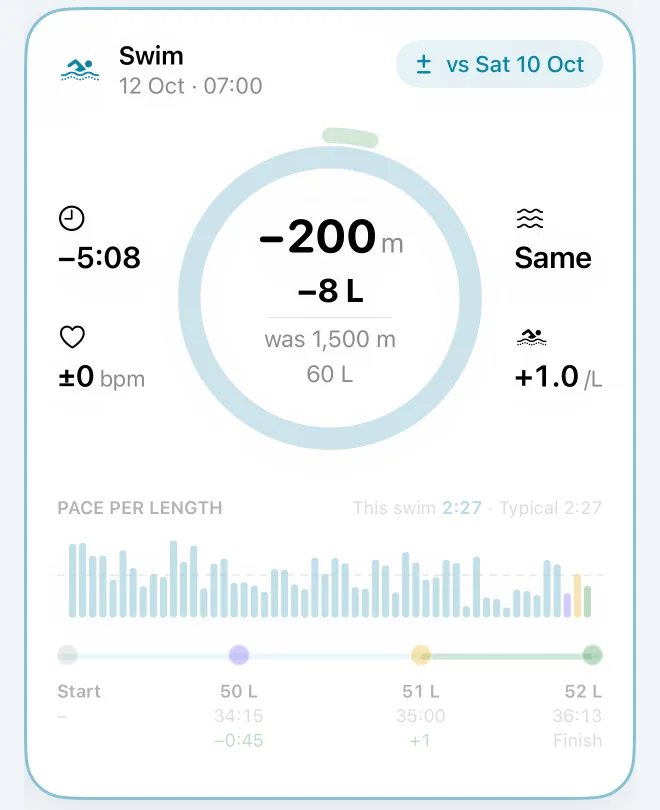
- Press and hold to compare with the swim before. The header says "vs" and the date, and every figure becomes its change: "+2:10", "+3 bpm", "+8 L", "was 1,300 m". Changes are never coloured better or worse: a longer swim isn't better or worse, it's just longer. Let go to see the swim again.
The six charts
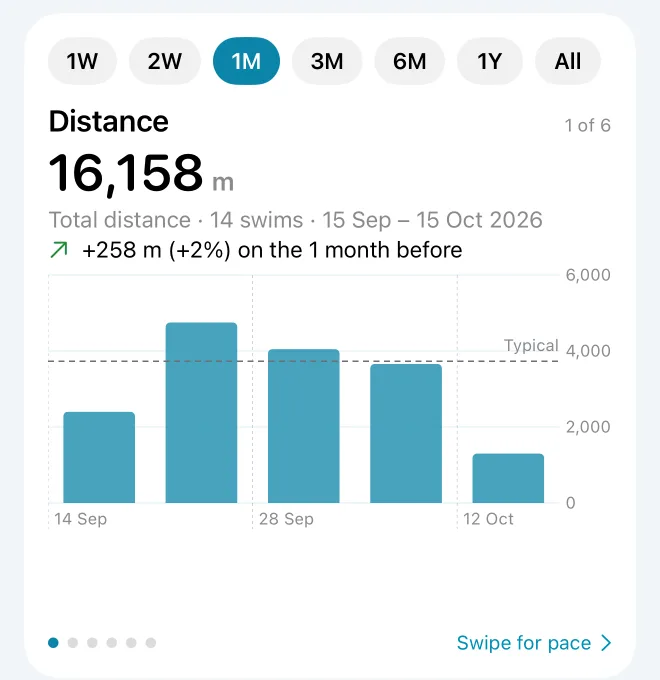
Distance, Pace, Strokes per length, SWOLF, Heart rate, Frequency
- How to use it
Swipe the card for the next chart; tap its title to open it in Progress. The pills choose the period: 1W, 2W, 1M, 3M, 6M, 1Y or All. Today and Progress share the period.
- What each shows
Distance: your total, with bars by week (or by month for six months and more) and a dashed line at your typical week. Pace: your typical pace, the median of one pace per swim. Strokes per length and SWOLF: medians, in your most-swum pool length. Heart rate: the median of each swim's average. Frequency: swims per week, with bars counting the swims in each week or month.
- The change line
Each chart compares the period with the same length of time just before: "9 sec faster than the 1 month before", "+500 m (+14%)". A green arrow is better, amber worse. Heart rate always shows a grey "=": a higher or lower heart rate isn't better or worse on its own. Comparing needs two swims in each period.
Periods are rolling: 1M is the month up to now, not the calendar month. On the dot charts each faint dot is one swim and the stronger line is the trend: a running median of your last 3 swims (1W, 2W) or 5 swims (1M), then the median per week (3M), fortnight (6M) or month (1Y). The line breaks across a gap of more than four weeks. Better is always up: for pace, strokes and SWOLF, where lower is better, the chart is drawn upside down. Press and drag on a chart to pick a swim, then tap its date to open it.
This week, insights and reports
This week adds up the distance since Monday against your typical week, with a dot for each day you swam; the bar turns green once you've matched a typical week. With a weekly target it says "2 of 3 swims this week".
Insights pick at most two things worth knowing, in this order: swims to check, a target you're ready to raise, a run of targets met, a change in your typical pace, efficiency or endurance over the last month, how even your lengths have been, and how many swims you've had this month. Each one only appears when the numbers support it (a pace change of more than 2%, at least two swims in each month, and so on).
After a complete week or month with swims, a report card appears for seven days until you open it. Below it are your five newest swims.
A swim
Tap any swim to open it. The title is its date; Share and Edit are at the top.
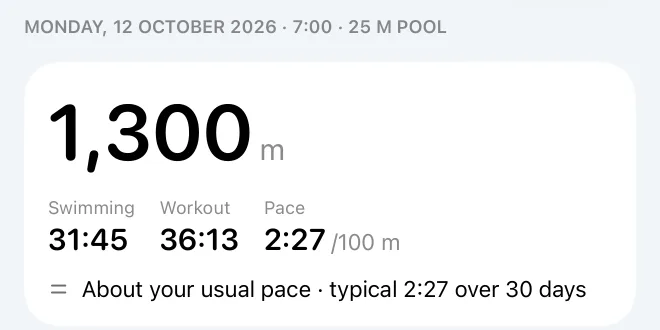
The headline
- What it shows
The date, time and pool, then the distance, swimming time (the lengths only), workout time (start to finish, as your Watch's timer, rests included) and pace per 100, worked out on swimming time.
- Against your usual
The sentence underneath compares the swim with your typical pace: "9 sec faster than your typical 2:11 over 30 days", or "About your usual pace" within 2%. Typical pace is the median of your swims in the 30 days before, in the same pool length, because turns make a 25 m pool quicker than a 50 m one. It needs three of them, and says so when there are fewer.
- Adjusted
An aqua Adjusted pill means a correction is in force; tap it to see what Health recorded, what you changed and when.
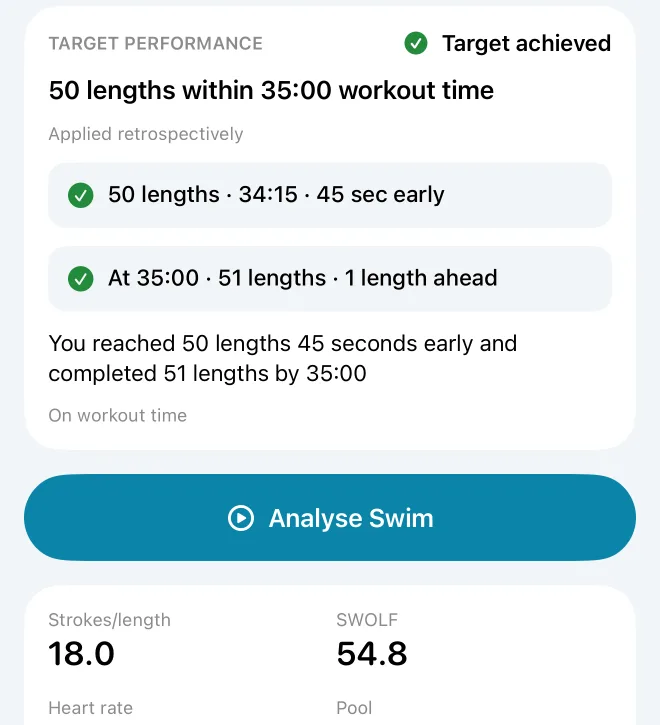
Target performance and the figures
- Target performance
For a target like "70 lengths within 40 minutes", two tiles: when you reached it ("70 lengths · 39:18 · 42 sec early", or Not reached) and where you were at the time limit ("At 40:00 · 71 lengths · 1 length ahead"), with a sentence that says both. For a target of conditions, a ring or row for each.
- The figures
Strokes per length (the median of your lengths), SWOLF, heart rate, pool, lengths and active energy, each only when Health has it. Notes underneath say when something is estimated, for example "Some stroke counts worked out from SWOLF".
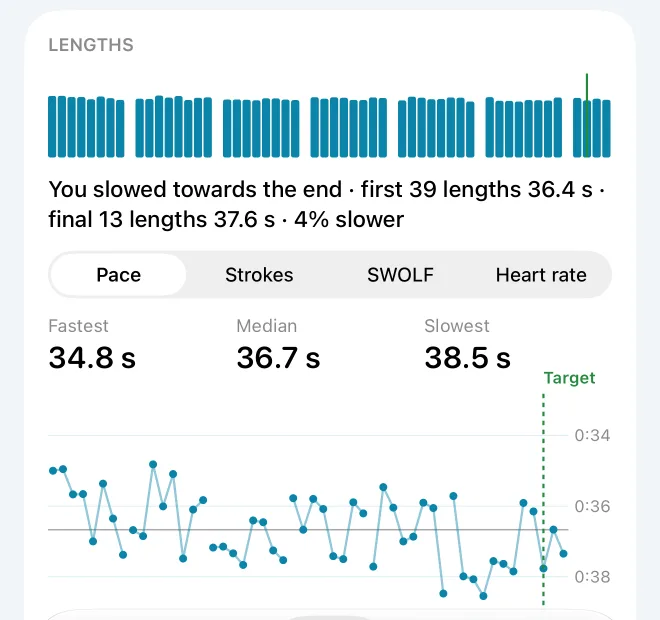
The swim strip and the lengths chart
- The strip
One bar per length in its stroke's colour, grouped into sets with gaps for rests. Taller is faster: a length at your median for the swim stands at about two thirds height. An amber dot marks an unusually slow length; a green line, the length where you reached your target.
- The chart
Choose Pace, Strokes, SWOLF or Heart rate. One dot per length in its stroke's colour and shape, joined within a set. The grey line is the swim's median. On the Pace tab the values are seconds per length ("34.2 s"), not pace per 100; better is up on every tab except heart rate.
- How to use it
Press and drag to pick a length: "Length 43 · 34.2 s · 14 strokes · SWOLF 48 · 150 bpm · Freestyle". With VoiceOver, "Show as a table" lists every length.
The stroke colours and shapes are the same everywhere: freestyle circle, breaststroke square, backstroke diamond, butterfly triangle, kickboard pentagon, mixed or unknown cross.
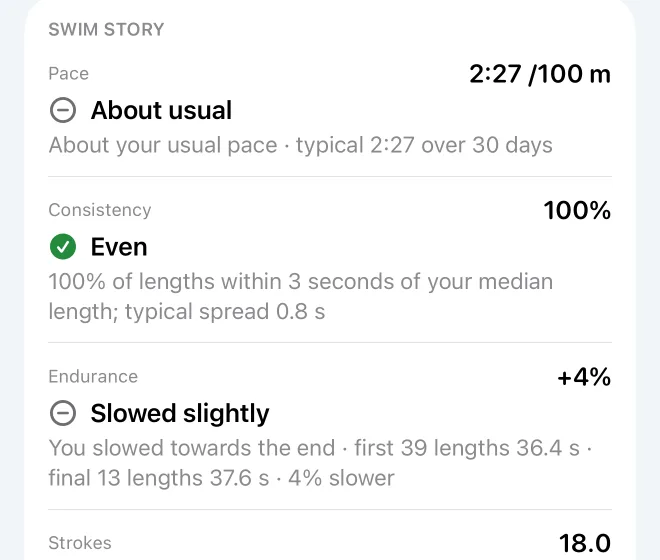
Swim story
- What it shows
Up to five short verdicts, each with the evidence under it:
Pace: faster or slower than usual by more than 2%, and "your quickest since" a date when that was at least four weeks ago. Consistency (8 lengths or more): the share of lengths within 3 seconds of the swim's median length; 80% or more is Even, 60% Mostly even. Endurance (20 lengths or more): your final quarter of lengths against the rest; up to 3% slower is Held pace. Strokes: strokes per length against your usual in that pool. Effort: your heart rate on the lengths swum at about your usual pace, against your usual.
- Worth knowing
The story says what changed, never why. Health records times, strokes and heart rate, not technique.
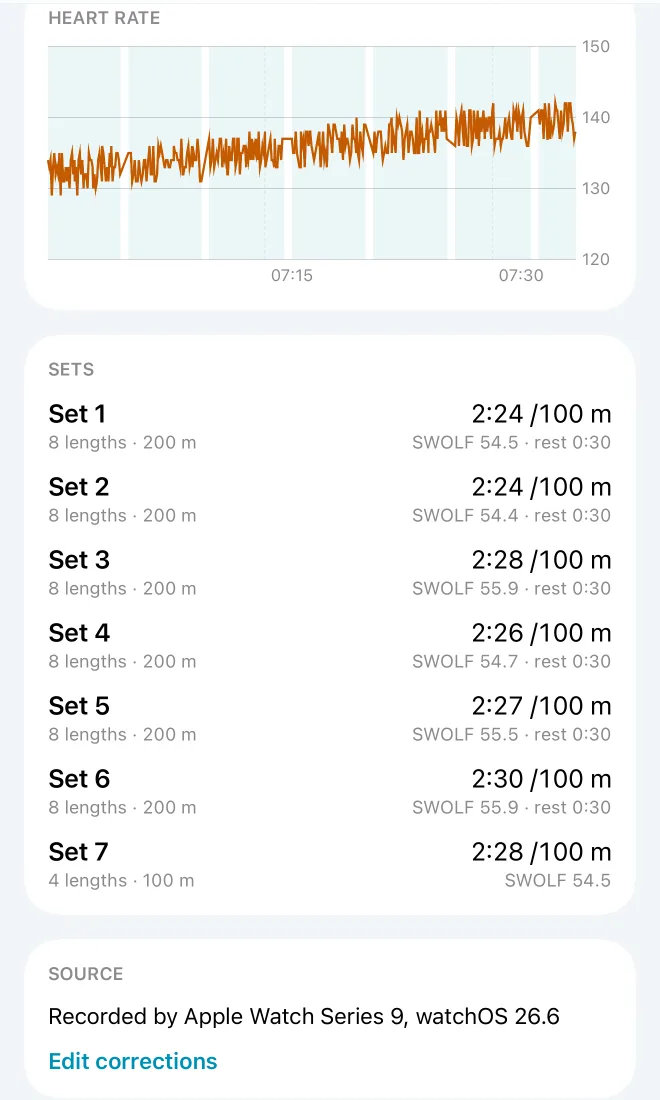
Heart rate, sets, stroke mix and source
- Heart rate
The amber line is every heart-rate reading your Watch took during the swim, over aqua bands for the sets. The scale doesn't start at zero, so changes look larger than they are.
- Sets
The sets your Watch marked, or, where it marked none, a new set after any rest of more than 10 seconds. Each shows its lengths, distance, pace, median SWOLF and the rest after it.
- Stroke mix
When you swam more than one stroke: the share of lengths in each.
- Source
Which Watch and watchOS recorded the swim, and every figure you corrected, struck through beside the new value. "Apple Health has not been changed."
Swim Timeline: replay a swim
Tap Analyse Swim on a swim, or Swim Timeline on Today's race card. Three tabs: Replay, Analysis and Metrics. A swim needs timed lengths to replay.
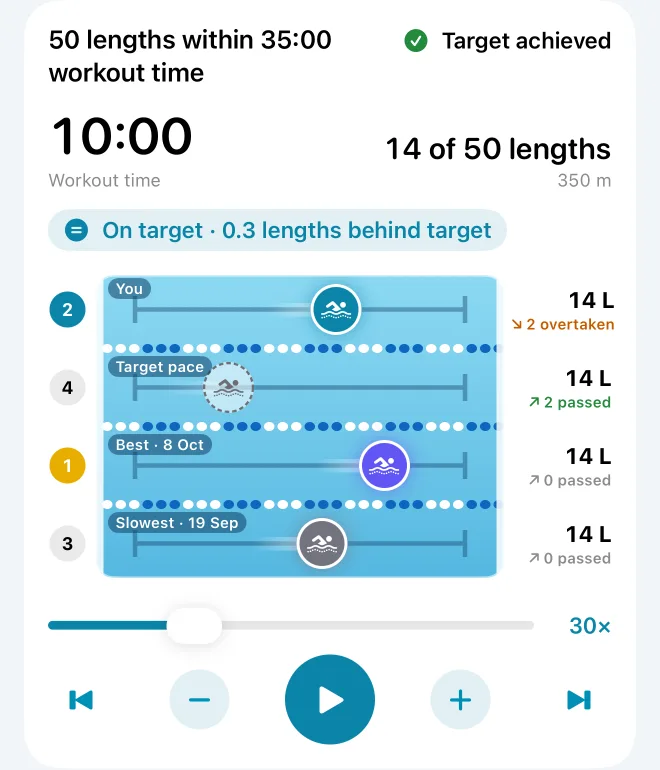
The race
- The lanes
Up to four swimmers race in a pool seen from above: You; Target pace, a see-through swimmer going at exactly the pace that just meets your target; and your Best (indigo) and Slowest (grey) swims of the 30 days before, in exactly the same pool length. Each swimmer turns at the walls and waits at the wall through their rests, as they really did.
- Colours and numbers
Your swimmer is aqua when you're within half a length of the target, shading to green when ahead and amber when behind (fully at a length and a half). On the left are the places; the leader's badge is gold. On the right, lengths done, and how often each swimmer has passed or been passed if everyone shared one lane.
- The status
Ahead when you're a length or more ahead of target pace, Behind a length or more behind, otherwise On target, with the exact lead: "Ahead · 1.2 lengths ahead of target".
- The player
Play, pause, jump to the start or end, drag the scrubber, or change speed with − and + (1×, 5×, then 15× to 240×; it opens at 30×). Under Reduce Motion the race doesn't play, but you can still move through it.
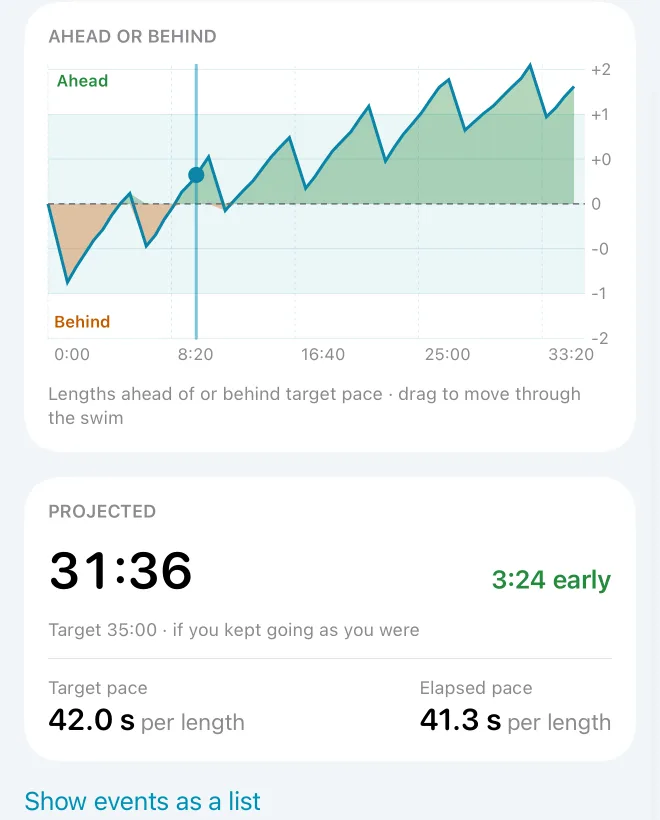
Ahead or behind, and the projection
- Ahead or behind
Your lead at every wall, in lengths: green above the line, amber below, with a pale band from one length behind to one ahead for "on target". Drag along it to move the replay.
- Projected
"If you kept going as you were": your next lengths at the rate of your recent ones (the median gap between your last ten lengths' ends), to give a finishing time and how early or late that is. It starts after two timed lengths. Under it, the target pace per length and your own pace so far.
- On your Watch
If you swam with Swim Sage's Watch app, the cues it played and where: "Halfway at length 25", "Target reached at length 50".
Analysis
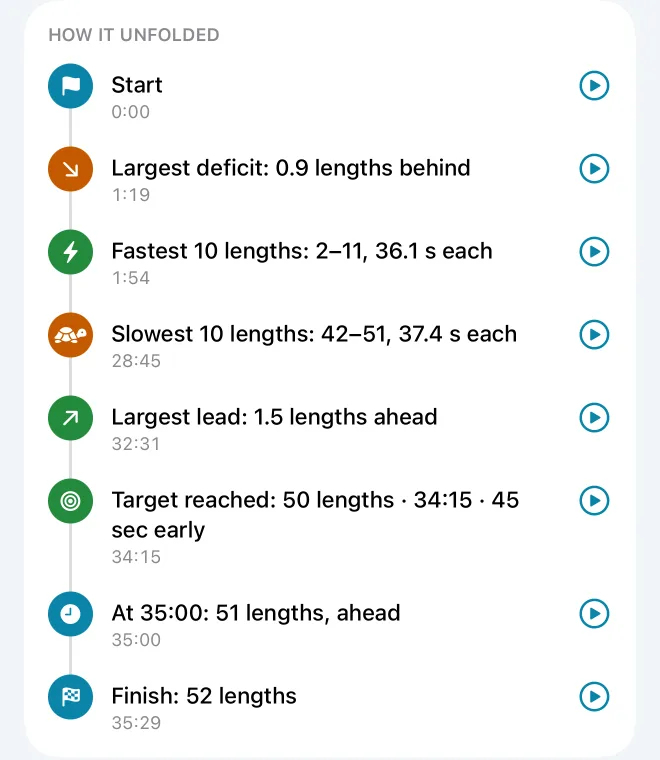
- How it unfolded
The moments that mattered, in order: your fastest and slowest stretch of lengths ("Fastest 10 lengths: 11–20, 32.1 s each"), your largest lead and deficit, when you got back on target, when you reached the target, and the finish. Tap one to replay from there.
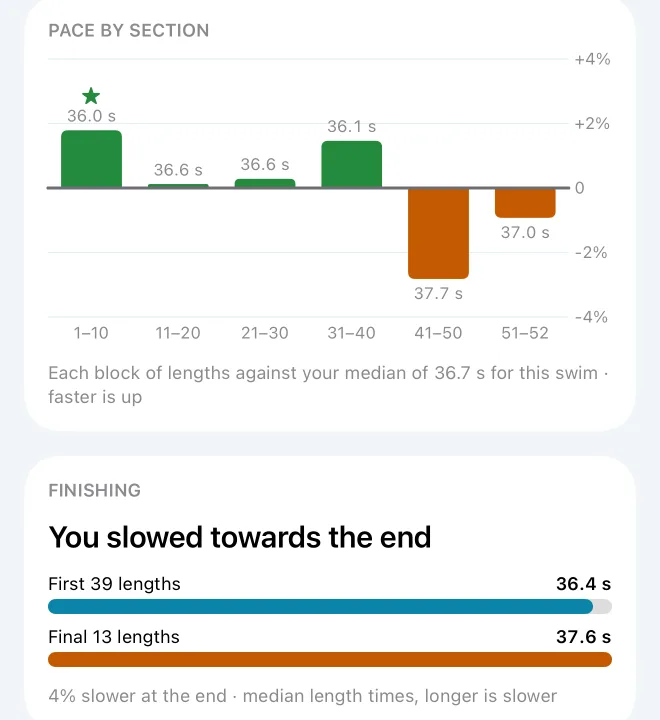
- Pace by section
Blocks of 10 lengths against the swim's own median length: green bars above the line were faster, amber below were slower, and the best block has a star.
- Finishing
From 20 lengths: your first three quarters against your final quarter, as median length times. Here a longer bar is slower.
Metrics lists the swim's figures, the length in progress at the replay's moment ("Length 23 · Freestyle · 34.2 s"), the lengths chart and every length; picking a length moves the replay there.
Progress
Progress shows how your swimming is changing. Choose a metric (on iPhone the chips at the top, with more under More), and a period. Each metric has its value, the change on the period before, its chart, "What this means" in a sentence, and "About" it. Metrics that depend on the pool length show one pool at a time, with a picker when you've swum more than one.
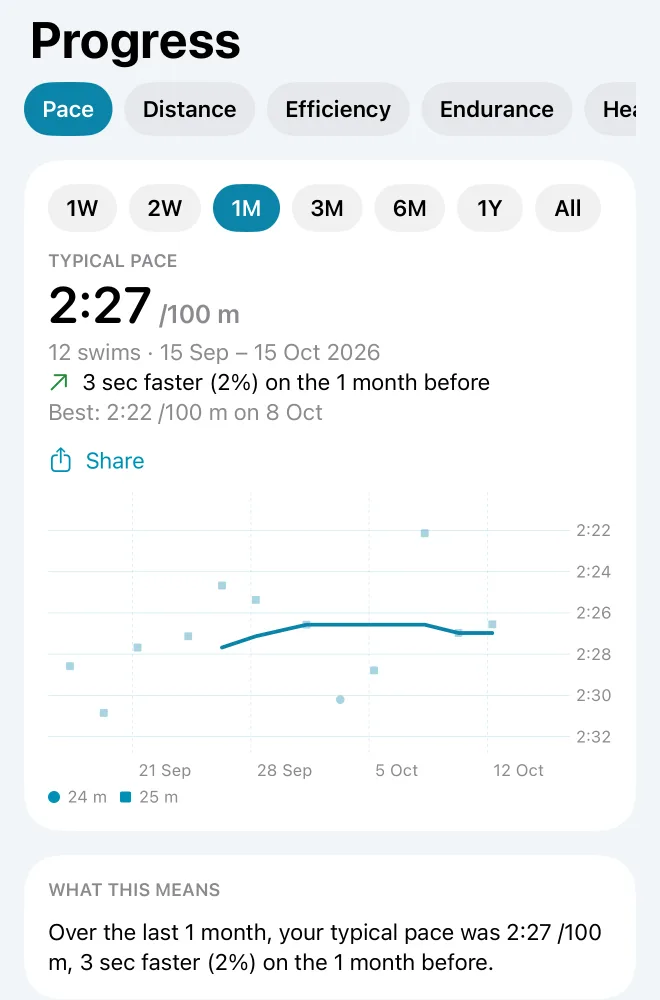
Pace, the main one
- What it shows
Your typical pace for the period: the median of one pace per swim, so one odd swim barely moves it. Each dot is a swim's pace (swimming time per 100, rests left out); the line is the trend. With more than one pool length, each has its own dot shape.
- The comparison
"4 sec faster (3%) on the 1 month before", and the best swim of the period. Share it from here.
Every metric
- Distance
- The lengths you swam times the pool length, added up. Open water swims and swims without lengths count too.
- Efficiency
- Pace and strokes per length together, this period against the one before, in one pool, with three or more swims in each. Nine possible results, from "Faster with fewer strokes" to "Slower with more strokes"; only the first two add "consistent with improved efficiency". Health records times and strokes, not technique, so Swim Sage can't say why.
- Endurance
- Your final quarter of lengths against the first three quarters, as a percentage. Positive means slower at the end. Needs 20 lengths.
- Heart rate
- Each swim's average heart rate, from your Watch's readings during the swim. Never called better or worse.
- Frequency
- Swims per week in the period.
- SWOLF
- A length's seconds plus its strokes; lower is more efficient. Each swim's value is the median of its lengths. Only comparable in one pool length.
- Strokes per length
- The median strokes per length of each swim, in one pool length.
- Distance per stroke
- The pool length divided by strokes per length, in metres.
- Effort for speed
- Your median heart rate on the lengths you swam within 3 seconds per 100 of your usual pace: whether the same speed is costing you less. Needs 10 such lengths with a heart rate.
- Consistency
- The share of lengths within 3 seconds of the swim's median length: how even your lengths were.
Records
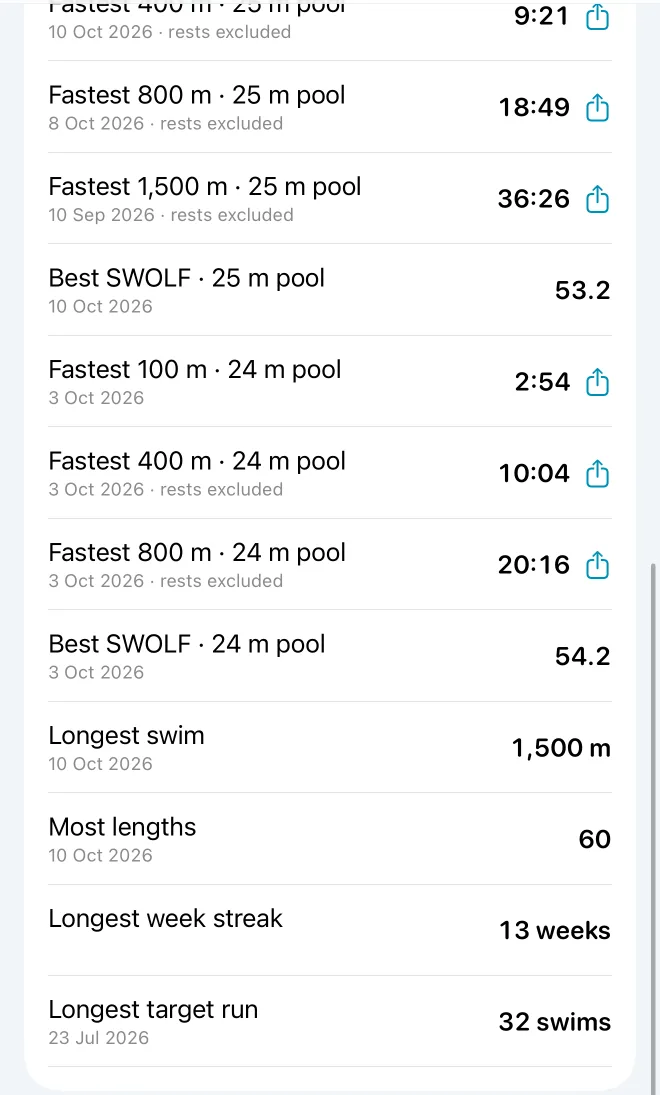
- What they are
Your fastest 100, 200, 400, 800 and 1500 m (100, 200, 500, 1000 and 1650 yd in a yard pool), each in its own pool length; your best SWOLF; your longest swim; your most lengths; your longest run of weeks swimming; and your longest run of targets met.
- How fastest is found
The quickest run of consecutive lengths that makes the distance, on swimming time. 100 and 200 must be inside one set; from 400 m a run can cross a rest, the rest isn't counted, and the record says "rests excluded". Tap a record to open the swim at that length.
Swims, and putting things right
Swims lists every swim by month, newest first, with its distance and pace (an asterisk means the pace includes rests, because the swim has no length timing). Search by date, pool or distance; filter by dates, pool, distance, stroke or target result. A pencil means a swim was corrected; a dimmed swim is excluded or recorded twice.
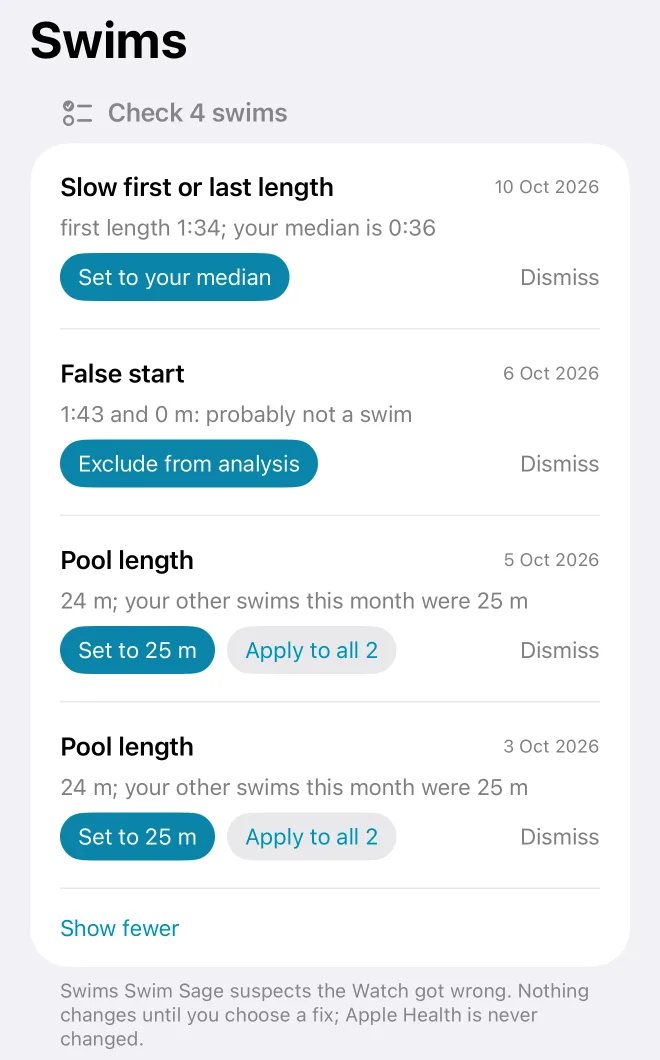
Check: what the Watch may have got wrong
- What it finds
False starts (no distance, or under two minutes). A pool length close to, but not, your usual one ("24 m; your pool is 25 m"). Time before or after swimming of more than a minute. A slow first or last length, or a stop inside a length, at more than twice your median. A length split in two. Overlapping length events, a swim recorded twice, and a correction that no longer matches after Health's data changed.
- How to use it
Each item offers its fix (Exclude, Set to 25 m, Trim to swimming, Set to your median, Merge the pair), Apply to all when other swims have the same problem, or Dismiss. Nothing changes until you choose.
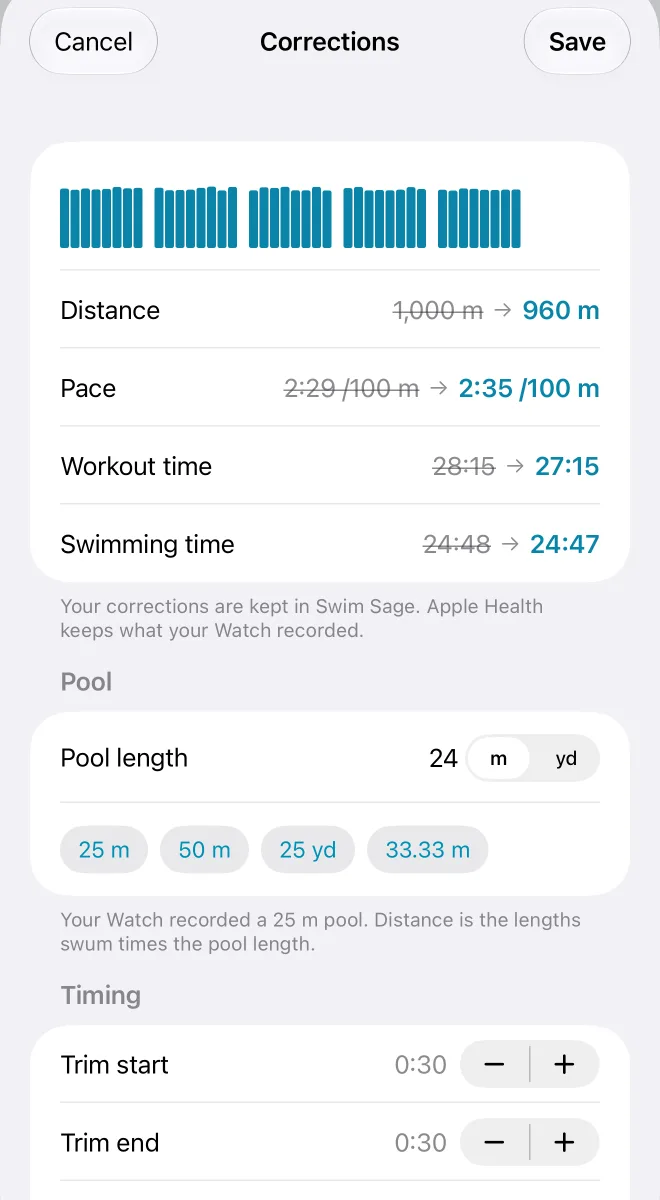
Correcting a swim
- What you can change
Pool length (distance becomes lengths × pool). Trim the start or end, or Trim to swimming. A length's time ("1:35", "95" or "35.5"). Leave out a length you didn't swim, or merge one the Watch split in two (swipe its row). The length count, as a last resort. The distance of a swim without lengths. Exclude the swim from analysis.
- What happens
Every figure, chart, baseline, record and target result uses the corrected swim. Apple Health is never changed: corrections live only in Swim Sage, and Revert to what was recorded undoes them all. An excluded swim stays in the list, dimmed, but out of everything else.
Select lets you correct many swims at once: set their pool, trim them, exclude them, or apply a target to them retrospectively.
Targets
A target is what you want a swim to be. Set one, and every swim from its start date is judged against it.
Three kinds of target
- Within a time
- A number of lengths or a distance within a time: "70 lengths within 40:00 swimming time". The one swimmers use most, and the one the race replay and the Watch's cues are built on.
- One condition
- At least 1,800 m; pace 2:20 or faster; 15 strokes per length or fewer; SWOLF 45 or lower; heart rate 130–145 bpm; and others.
- All of
- Two to seven conditions that must all hold.
Which clock? Swimming time counts only your lengths, so rests are left out. Workout time runs from the start, rests included, as your Watch's timer does.
How a swim is judged. For a target within a time, Swim Sage finds the length on which you reached the amount and when, on the target's clock, and how many lengths you had done at the time limit. Achieved means reached by the time limit, with half a second's grace. A swim without timed lengths can't be judged.
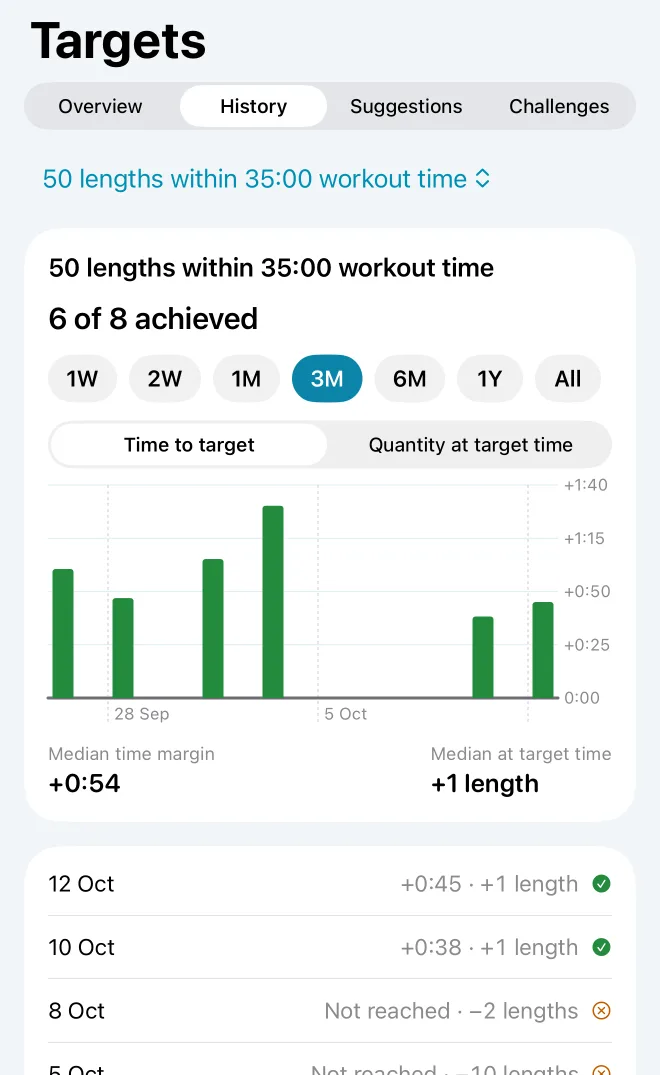
Overview, History and Suggestions
- Overview
Your target, how many of your last ten judged swims achieved it, your current run, and your weekly target (at least N swims a week) with your week streak.
- History
Every judged swim's margin as a bar, green when achieved, amber when not: by time ("+0:42" early) or by lengths at the time limit. Medians underneath.
- Suggestions
After six achieved swims in a row with room to spare, "Ready for more?" offers a step up. With no target, a first one from your last 60 days in your usual pool. Nothing is applied unless you tap it.
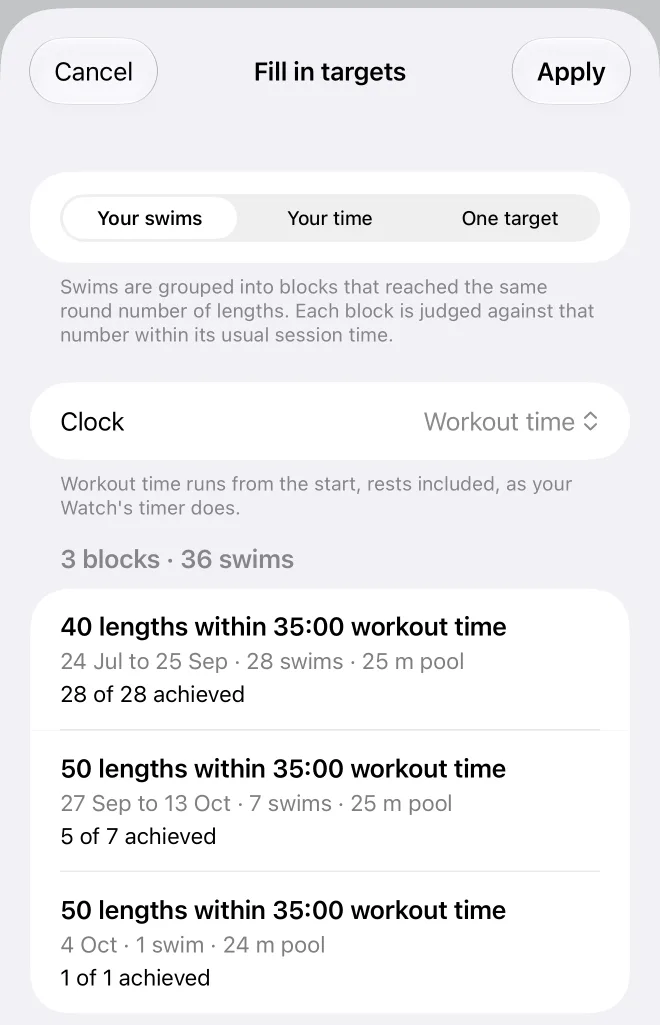
Filling in targets for earlier swims
- Why
Swims from before your first target have no result and no timeline. Fill in targets gives them one.
- Three ways
Your swims: Swim Sage groups your swims into blocks that reached the same round number of lengths (rounded down to tens) and judges each block against that number within its usual session time. Your time: the same blocks, against a time you choose. One target: one target for every swim without one.
- Worth knowing
It's a guess at what you were aiming for, so some swims will miss. Undo takes it back straight away.
Challenges
On Targets, Challenges, tap New Challenge, then send it through Messages, or keep it to yourself. Your friend needs Swim Sage to accept it. Nobody is ranked, and nothing is sent unless you send it.
- One swim, personal
- Everyone improves by the same percentage on their own swims: "10% more lengths in 40:00". When you accept, Swim Sage works out your number from your own target or your last swims, and shows the sum: "42 × 1.10 = 46.2, so 47 lengths".
- One swim, head-to-head
- Everyone gets the same target, converted to your pool if it differs.
- A total over dates
- "10 km this month", "400 lengths of 25 m in 30 days", or "10% more than last month". Every swim in the dates counts, open water included. A dashed line shows the even pace to the target, and Swim Sage says how far ahead or behind it you are and what each swim needs to be at your usual rate.
Swims after you accept count automatically; corrections apply, so excluding a swim can take a result away. You choose exactly which figures go in each message; heart rate is never preselected.
Ask and reports
Ask a question
- What you can ask
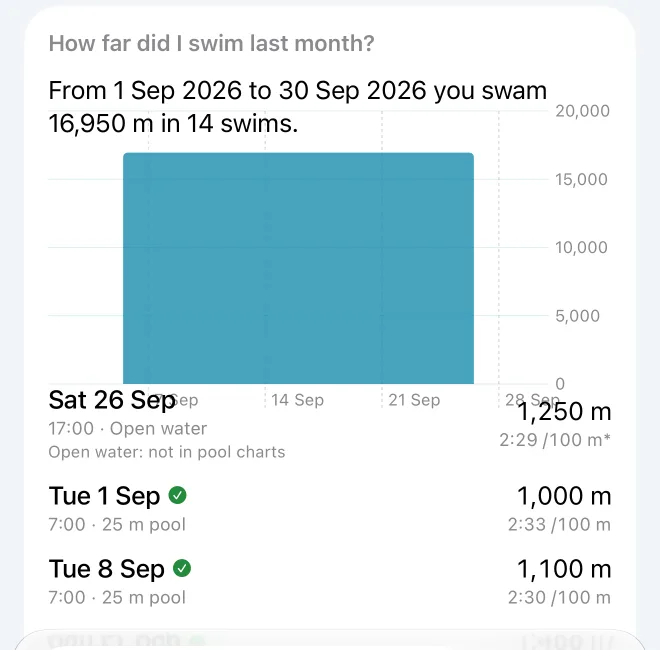
"How far did I swim last month?" "How has my pace changed since July?" "Which swims had my best SWOLF?" "Am I faster before 8 am?" "How often did I meet my target this month?" Type it, or tap the microphone and speak.
- How it's answered
Swim Sage first answers the questions it knows itself, with no model. Others go to Apple's on-device model, which is only allowed to fetch figures from your swims, never to calculate them, and every number in its answer is checked against what it fetched. "How this was worked out" shows the workings. Nothing is sent anywhere.
Reports cover each complete week and month: your distance and swims, typical pace against the period before, your fastest swim, new records, how you finished, efficiency, how even your lengths were, and your targets.
Swim Sage on your Apple Watch
Swim with a target, and quiet cues
- Before you swim
Open Swim Sage on your Watch, choose your target (your default, or a challenge), check the pool and the cues (Off, Quiet or Standard), and tap Start in Swim Sage. Or tap Open in Workout to swim with Apple's Workout app instead.
- While you swim
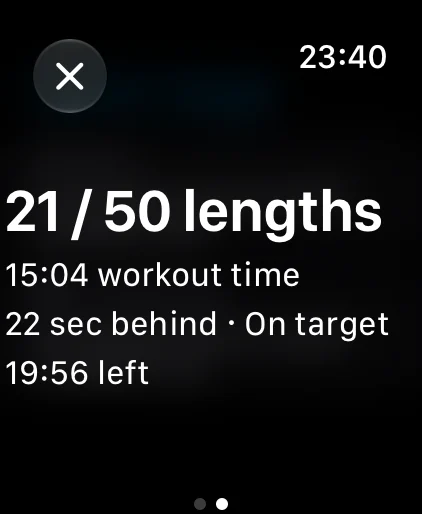
"21 / 50 lengths", your time on the target's clock, how far ahead or behind target pace you are, and the time left. Swipe for Pause and End.
- The cues
Taps on your wrist, only at the wall: halfway, a final push near the end if you need one, and target reached. Standard adds ahead or behind at two thirds, and back on target. At most three besides the goal, at least four lengths apart, and never from your heart rate.
- Afterwards
The swim is saved to Apple Health like any Watch workout, and your iPhone judges it against the target you chose.
iPad, Apple Vision Pro and Sync
iPad has the same app with more room: Today shows all six charts at once, and a swim's sections sit side by side. Apple Vision Pro runs Swim Sage natively; on a swim's race, Race in 3D opens the pool on the table in front of you, with the same swimmers, places and colours, and the player beneath. Your swims reach each device through Apple's own Health sync; challenges are viewed on iPad and Vision Pro and started on iPhone.
Sync with nearby device (Settings) brings your corrections, targets, pools and challenges across, directly between your own devices, with no iCloud or internet. Open it on both, near each other. On one, tap Pair a device and Show a code; on the other, choose it and type the code. Both then show the same six-digit number: if it matches, tap They Match on both. After that, tap Sync now whenever you like. Your swims are never synced: each device reads its own from Health.
Settings and your data
- Pools
- Name your pools and their lengths. Check uses them to spot a swim recorded with the wrong pool, and your Watch offers them.
- Units
- Metres or yards, as your Health app uses for swimming distance; change it in Health. Pace is per 100 of that unit.
- Spoken answers
- Reads Ask's answers aloud.
- Export as spreadsheets
- Two CSV files, every swim and every length, as Swim Sage shows them (corrected, in metres and seconds). They contain your health data, so you choose where they go.
- Data & Privacy
- What Swim Sage reads and where it goes, and Delete Swim Sage Data, which removes your corrections, targets, pools and challenges from that device. Apple Health isn't touched.
Words Swim Sage uses
- Length
- One length of the pool, as your Watch records it. Swim Sage never says lap.
- Pace
- Swimming time per 100 metres (or yards), rests left out. Shown as minutes and seconds: 2:11 /100 m. A swim without length timing has its pace from workout time, rests included, marked with an asterisk.
- Swimming time
- The time spent in your lengths, added up. Rests at the wall don't count.
- Workout time
- From the start to the end, less any pauses, as your Watch's timer shows. Rests count.
- Typical pace
- The median of one pace per swim. Against a single swim: the median of your swims in the 30 days before, in the same pool length, needing three.
- Median
- The middle value when they're put in order. Swim Sage uses it rather than an average so that one odd swim or length barely moves things.
- SWOLF
- Swim golf: a length's seconds plus its strokes. Lower is better. Only fair within one pool length.
- Strokes per length
- Arm strokes your Watch counted in a length. Where Health has only a total for the swim, the average is shown and labelled as one.
- Set
- A run of lengths between rests: the segments your Watch marked, or, failing that, broken by any rest of more than 10 seconds.
- Counted swim
- A pool swim of at least 100 m with timed lengths and a plausible pace (0:30 to 10:00 per 100), not excluded. Only counted swims go into pace, baselines and the stroke metrics; distance, frequency and streaks count every swim.
- Like for like
- Turns make pace depend on the pool, so pace comparisons, SWOLF, strokes and records compare a swim only with swims in the same pool length.
- Week streak
- Weeks in a row (Monday to Sunday) that met your weekly target, or with no weekly target, had at least one swim.
- Better is up
- On every chart except heart rate, up means better: where lower is better (pace, SWOLF, strokes), the scale is turned over.
Where the numbers come from
Everything starts from what your Apple Watch saved to Apple Health. Swim Sage reads, for each swimming workout: its length events (each with a start, an end and a stroke style), the sets the Watch marked, any pauses, the pool length, whether it was a pool or open water, the distance and stroke counts, and the heart-rate readings during it.
- Strokes per length come from the stroke-count samples inside each length; where a sample spans several lengths it is shared between them.
- Distance is your counted lengths times the pool length; without a pool length, Health's own distance.
- A swim recorded twice (by your Watch and another app, say) is counted once: the Apple Watch copy with lengths is kept.
- Older Watches (watchOS 3) recorded only when each length ended; those times are estimated and include any rest, and Swim Sage says so.
Health records what you did, not why. Swim Sage tells you what changed, and leaves the why to you.